
Exception is an alternate name for an error. Errors are always likely to occer and it is important to provide means to handle them. Conventional languages such as C do not found ect., In such cases the program is abnormally terminated without further processing.
Java gives you the advenced technique of handling such errors without abnormal program termination. The advanced mechanism of handling such errors is known as exception handling. Basically there are two types of errors in java namely
- Compile time error.
- Run time error.
Compile time errors are the errors generated during the complication of program and easier to rectify because they are generated mostly due to the wrong syntax’s.
Sources of errors:
- User input errors: There are typing errors, syntax errors, incorrect or non-existing URL’s.
- Device error: These errors occur when there are some problems with devisor such as printers, disc drivers etc.,
- Physical Limitation: These errors occur with respect to physical entities or capacities such as space are not available on discs or main memory.
- Coding errors: Errors that occur when some logic is wrong, such as locating non-existing files, data structures etc.,
When an error in a program occurs, we must do the following.- Notify the user of an error.
- Save all the work.
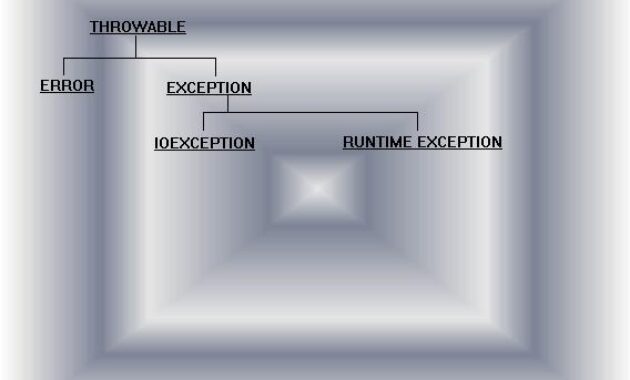
- Allow users to exit from the program or continue the rest of the program. Exception are a part of the inheritance hierarchy in Java which are handled by the following class.
-
- All classes are derived from the root class throwable.
- Error class: This class describes all internal error such as out of disc space, device errors etc., user can be intimated about such errors but you cannot rectify them.
Java provides you an efficient way of handling runtime error. The mechanism of handling run time error is referred as “exception handling”. In Java exceptions are handled by two ways…
- try…catchblock.
- throws clause.(Streams)
Syntax:

try
{
…....................
Block of code;
…...................
}
catch(Exception object)
{
….................
}
import java.lang.*;
class App57
{
public static void main(String yck[])
{
try
{
int x,y,k;
x=Integer.parseInt(yck[0]);
y=Integer.parseInt(yck[1]);
k=x/y;
System.out.println("x="+x);
System.out.println("y="+y);
System.out.println("k="+k);
}
catch(Exception e)
{
System.out.println(e);
}
System.out.println("Executed this line ...");
}
}


output:

\>javac App57.java
\>java App57 10 20
x=10
y=20
k=0
Executed this line ...

\>javac App57.java
\>java App57 10 0
java.lang.ArithmeticException: / by zero
Executed this line ...
Multiple catch blocks:
A try block can be accompanied by any number of catch blocks.
Syntax:

try
{
…..................
block of code.
…................
}
catch(Exception object1)
{
….................
}
catch(Exception object2)
{
…...................
}
…..................import java.lang.*;
class App58
{
public static void main(String yck[])
{
try
{
int x,y,k;
x=Integer.parseInt(yck[0]);
y=Integer.parseInt(yck[1]);
k=x/y;
System.out.println("x="+x);
System.out.println("y="+y);
System.out.println("k="+k);
int p[]=new int[3];
int i;
for(i=0,k=10;i p[i]=k;
System.out.println("Elements of the array ...");
for(i=0;i System.out.println(p[i]);
p[42]=100;
System.out.println(p[42]);
}
catch(ArithmeticException ae)
{
System.out.println(ae);
}
catch(ArrayIndexOutOfBoundsException e)
{
System.out.println(e);
}
System.out.println("Executed this line ...");
}
}
output:
\>javac App58.java
\>java App58 10 20
x=10
y=20
k=0
Elements of the array ...
10
20
30
java.lang.ArrayIndexOutOfBoundsException
Executed this line ...
\>javac App57.java
\>java App57 10 0
java.lang.ArithmeticException: / by zero
Executed this line ...Syntax:
try
{
….................
try
{
….................
}
catch(Exception object1)
{
…..................
}
}
catch(Exception object2)
{
..............….
}import java.lang.*;
class App59
{
public static void main(String yck[])
{
try
{
int x,y,k;
x=Integer.parseInt(yck[0]);
y=Integer.parseInt(yck[1]);
k=x/y;
System.out.println("x="+x);
System.out.println("y="+y);
System.out.println("k="+k);
try
{
int p[]=new int[3];
int i;
for(i=0,k=10;i p[i]=k;
System.out.println("Elements of the array ...");
for(i=0;i System.out.println(p[i]);
p[42]=100;
System.out.println(p[42]);
}
catch(ArrayIndexOutOfBoundsException e)
{
System.out.println(e);
}
System.out.println("Executed this line ...");
}
catch(ArithmeticException ae)
{
System.out.println(ae);
}
}
}
output:
\>javac App59.java
\>java App59 10 20
x=10
y=20
k=0
Elements of the array ...
10
20
30
java.lang.ArrayIndexOutOfBoundsException
Executed this line ...
\>javac App59.java
\>java App59 10 0
java.lang.ArithmeticException: / by zero
Executed this line ...Throws clause: Sometimes a method is capable of causing an exception that it does not handle, it must specify this behaviour so that callers of the method can guard themselves against that exception. You do this by including a “throws” clause in the methods’s declaration.
Syntax:

type method_name(parameter list) throws exception_list
{
body of the method;
}